Restaurant operations platform

Your restaurant.
Connected.

Run POS, Kitchen (KDS), Staff, browser-based management and direct ordering as one connected restaurant operation.

Starter is available now and free during launch
Start Starter free
Fixed plans from £49 GBP / location / month
EUR prices · USD prices

Android™

TableSync POS, Staff and Kitchen (KDS) are available on Google Play for Android.

Control Centre Today with recorded operational workload.
Today and attention queue · Demonstration data
Kitchen ticket HV-2412: Table 12, round 2, six minutes elapsed, burger modifiers and No onion note.
Kitchen ticket detail · Demonstration data
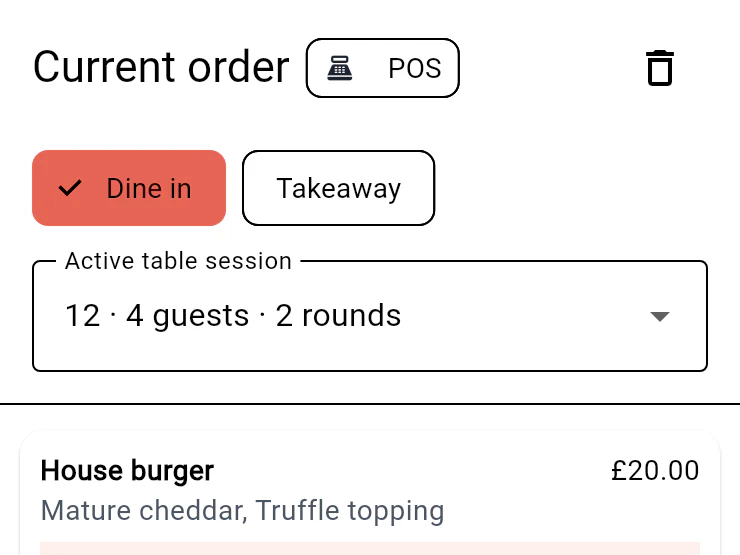
POS menu and Table 12 basket with required choices, a preparation note and a £45.50 subtotal.
Menu and basket · Demonstration data
Staff floor view with Table 12 occupied by four guests in round 2 and other table states.
Your floor · Demonstration data

Actual TableSyncAI interfaces, shown with synthetic restaurant data.

  • Kitchen ticket HV-2412: Table 12, round 2, six minutes elapsed, burger modifiers and No onion note.

    Kitchen

    Dispatched work, with table and round.

  • Staff floor view with Table 12 occupied by four guests in round 2 and other table states.

    Staff

    Floor service and shift actions.

  • Control Centre Today with recorded operational workload.

    Control Centre

    Current work and the next action.

Eligible international onboarding

Restaurant onboarding across 34 countries.

Available for eligible restaurant onboarding across 34 countries.

Onboarding is subject to eligibility. Product, hardware, tax, currency and support terms may vary by country. Availability does not imply a local office, local-language support or every capability in every country.

View eligible countries

Run the restaurant

Keep service moving, from the first order to the last table.

Four connected products, each with a clear job. The detail stays with the order as your team works.

TableSync POS

Built for real menus and real service.

Take detailed orders, add another round, combine or divide bills and keep cash accountable. A familiar till becomes the starting point for a connected operation.

  • Menu variants, modifiers and item notes
  • Tables, guests and separate rounds
  • Split bills, cash accounting and visible recovery
AndroidAvailable on Google PlayReviewed .
TableSync POS for Android

Electronic payment collection is not enabled. Confirm device and printer compatibility before setup.

Explore POS
POS menu and Table 12 basket with required choices, a preparation note and a £45.50 subtotal.
Menu and basket · Demonstration data
Kitchen board with three preparing tickets; Table 12 round 2 has elapsed six minutes.
Dispatched kitchen board · Demonstration data

Kitchen clarity.

Prepare dispatched orders with the choices, table and round intact. Elapsed-time alerts keep older work visible.

AndroidAvailable on Google PlayReviewed .
TableSync Kitchen (KDS) for AndroidExplore Kitchen
Staff floor view with Table 12 occupied by four guests in round 2 and other table states.
Your floor · Demonstration data

Your floor team, attendance and safety—connected.

Authorised employees can work with tables and rounds, clock in and out, record breaks and keep actions accountable. Connected browser-based safety checks retain completion evidence for manager review.

AndroidAvailable on Google PlayReviewed .
TableSync Staff for Android

Safety checks run in the Control Centre, not inside the Staff app. Staff payment collection, payroll and rota planning are not included.

Explore Staff

Take direct orders

Your restaurant website. Your menu. Your customers.

A branded customer ordering experience, connected to TableSyncAI.

Your restaurant website

Illustrative setup overview

www.myrestaurant.com
Your restaurant identityTableSyncAI ordering

A hosted ordering storefront with your restaurant’s branding, menu and product choices.

Example address. Custom domains require verification and setup.

A direct route to your restaurant.

  • Your restaurant’s branding
  • Menu choices connected to your operation
  • Customer order-status visibility
Explore restaurant websites & ordering
Direct Ordering burger choices with allergens, required cheese, optional extras and Add £20.00.
Menu customisation · Demonstration data
Direct order HV-2418 awaiting restaurant acceptance, with later preparation and collection states still pending.
Order tracking · Demonstration data
  1. 01

    Choose your web address

    Start with a hosted ordering address, or arrange an eligible custom domain with verification and assisted setup.

  2. 02

    Connect your restaurant

    Ordering belongs to your TableSyncAI restaurant and location, alongside POS, Kitchen and the Control Centre.

  3. 03

    Prepare your menu

    Prepare products, choices and availability, with your restaurant’s branding for the customer experience.

  4. 04

    Complete setup and take orders

    After setup, customers submit orders for restaurant acceptance. POS and Kitchen continue service, with management oversight.

Setup is assisted. Current storefront orders are processed in GBP; online card payment is not available. Diner-order currency and payment availability are separate from TableSyncAI subscription pricing.

Keep control

See the whole operation. Act where it matters.

Menus, locations, people, stock and food-safety records — alongside the orders that need attention.

Control Centre Today with recorded operational workload.
Today and attention queue · Demonstration data
Riverside location override with its own £18.50 price and local availability control.

Menu control

Publish centrally, with deliberate local price and availability overrides.

Location oversight

Bring attention queues and recorded service health into view.

Operating records

Keep stock movements, compliance evidence and staff permissions close to service.

Recorded operational state, not external-provider uptime. Order value is not settled revenue.

Product roadmap

See what’s next.

Explore our roadmap for payments, Windows POS, AI ordering and marketplace connections.

Explore the product roadmap

Choose a plan

Start with TableSync for free.

Get POS, Kitchen Display, Staff, Control Centre and hosted direct ordering with no setup fee and no card required. Starter is free during the launch period.

Available now

Starter

Start with TableSync for free

£0 GBP to start

Free during the launch period · no card required

Future usage pricing of 10p per completed order, capped at a proposed £39 per location/month. Proposed pricing is subject to final commercial terms.

  • No card required
  • No setup fee or fixed monthly subscription during the launch period
  • No fixed-term contract
  • Eligible Android apps and core Control Centre functions
  • Eligible hosted TableSyncAI ordering address

Billing and chargeable metering are not active. Future charging will begin only after reasonable advance notice, your explicit agreement and billing authorisation where required. Launch-period orders will never be charged retrospectively.

Core

The foundations of a connected restaurant.

£49 GBP

per location / month

  • Restaurant and location foundation
  • Menu and operational setup
  • Digital food-safety records
Explore Core setup

Complete

Plan a broader restaurant web presence.

£149 GBP

per location / month

  • Everything in Pro
  • Restaurant website options
  • Website and domain scope agreed during setup
Explore Complete setup

GBP future-pricing view shown. Future usage pricing of 10p per completed order, capped at a proposed £39 per month, will begin only after reasonable advance notice and your explicit agreement. We will never charge retrospectively for launch-period orders. Manual onboarding, eligibility and supported-country terms apply; submitting an enquiry does not create or activate an account. Planned AI and marketplace services are not live plan inclusions.

Built from restaurant experience

A practical product journey since 2004.

Salim Chowdhury, founder and principal architect of TableSyncAI

Founder

Salim Chowdhury

Founder and Principal Architect, TableSyncAI

Salim leads product direction, architecture and delivery through Thynkr Systems. His restaurant-technology journey began in 2004 and developed through SmartOrder, iPOS and OrderPIN into TableSyncAI.

Hands-on restaurant operating experience keeps the work focused on practical service, kitchen, staff and management workflows.

Agency Partner Programme

Introduce and support restaurant clients—with their consent.

Agencies can introduce and support restaurant clients while restaurant ownership stays with the restaurant. Access is owner-consented, scoped and revocable.

Your expertise. Their restaurant. A shared relationship.

Owner-consented access · Scoped permissions · Revocable assistance

20%

1–9 active managed locations

25%

10–24 active managed locations

30%

25–49 active managed locations

35%

50+ active managed locations

Rates apply to eligible revenue under the partner agreement, not all restaurant sales. Eligibility, exclusions and payout arrangements must be agreed before participation. Commission records are implemented; automatic payouts are not. Registering interest does not guarantee admission or earnings.

Eligibility, exclusions and payout terms require agreement. Automatic commission payouts are not currently claimed, and applying does not create an account or guarantee approval.

Blog and insights

Practical ideas for running a connected restaurant.

View all insights

Experience and support

Practical help for your next step.

A team you can contact.

Discuss your restaurant, find the right setup route or ask for help with an existing account.

Contact the team

Practical answers.

Useful guides for service, recovery, device access and getting set up.

Find support

Ideas for your restaurant.

Read our guides to direct ordering, kitchen displays and choosing your web presence.

Read the blog

Built on restaurant experience since 2004.

Our founder’s restaurant-technology journey combines product development with hands-on restaurant operations. That experience shapes TableSyncAI today.

Read our story
  1. SmartOrder
  2. iPOS
  3. OrderPIN
  4. TableSync
  5. TableSyncAI

Your next step

Choose how your restaurant gets connected.

Compare the plans, check eligible access and arrange your setup. Prefer to talk it through? A demo is always an option.

Lana AI

Your TableSyncAI support assistant

Guided help · AI conversation is not connected. Browse reviewed answers and useful links.

What would you like help with?

Opening reviewed guides…

No private restaurant access or account actions. Never share passwords, staff PINs or full card details. Your topic selection stays in this page’s memory; it is not sent to an AI provider or stored as a transcript.